Symbols
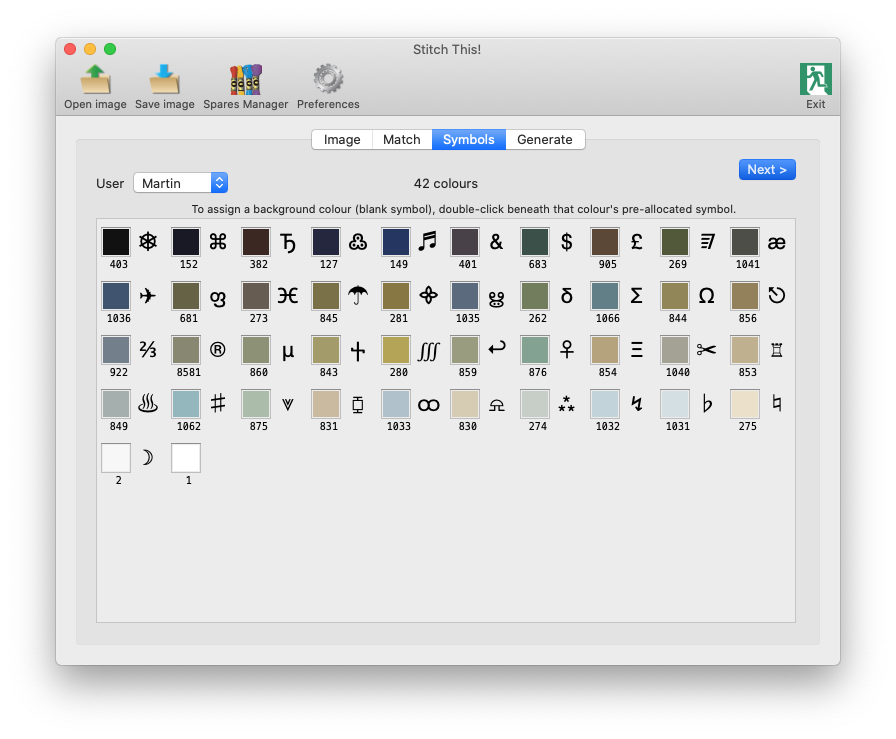
This shows the symbols that have been allocated to each colour in the image's current palette, as well as the thread number from your chosen range.
Note the User popup - here you can select a predefined symbol set for a particular user, if one has been set up. These can enable you to customise the output to the fullest extent possible - and hopefully eliminate any combinations of symbols which you could easily confuse with one another. For details of how to create a symbol set, please refer to the
Preferences
topic.
Please also note that the final colour in the above illustration, number 1, has no symbol allocated. This is because you can choose a colour which will be displayed on the output charts as an empty square. This might be a background (such as sky), or where you could use the colour of the canvas to show through, for example. You can choose which colour is represented by an empty square by double-clicking just beneath that colour's allocated symbol.
Clicking the
Generate
tab from the tab set at the top, or the
Next >
button, will move on to the final step.